
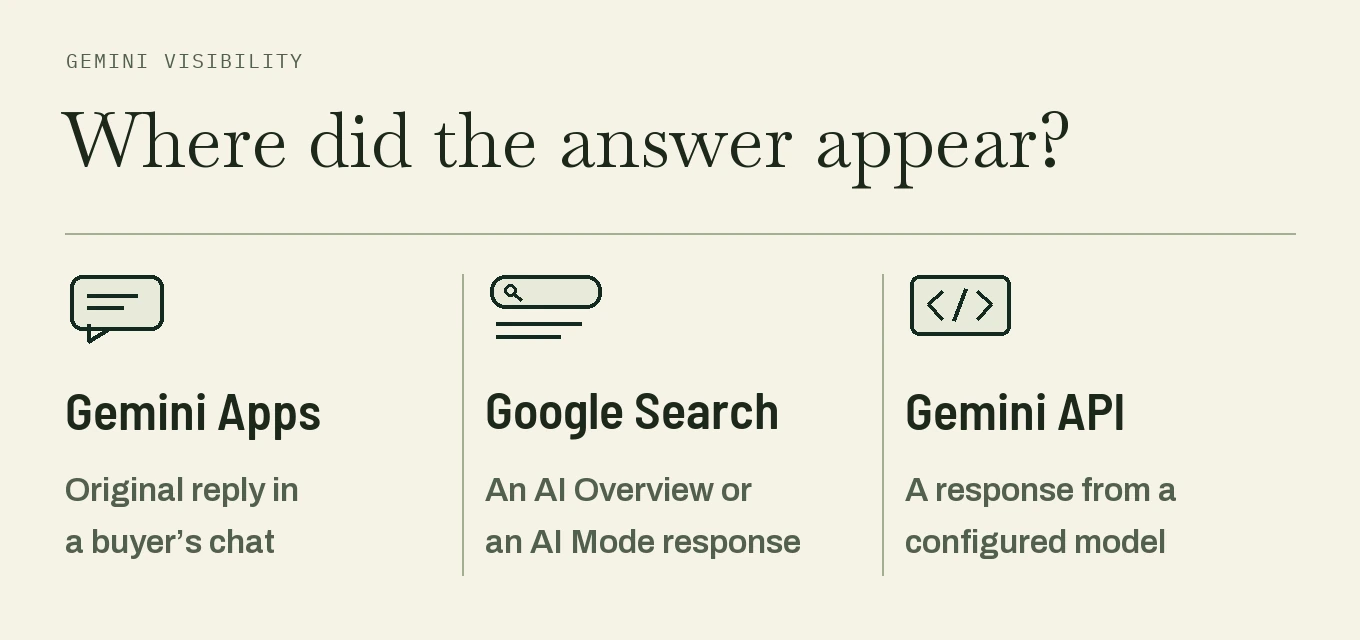
A Gemini visibility tracker should tell you whether a buyer asking a specific question in Gemini sees your brand, gets a recommendation for it, or can follow a link to your site. To measure the experience in Gemini Apps, save the original answer and its links from the app itself. You can do this with a spreadsheet and a few questions from recent sales calls. If you use an automated tracker, check which Google product actually produced its answers.
Which Google experience are you measuring?
| Where the question runs | What you can measure |
|---|---|
| Gemini Apps, such as the chat at gemini.google.com | The reply shown in the observed session. Save the wording, visible links and any recommendation. Some replies include a Sources panel. A completed answer with no links is a valid observation. Google’s guide to Gemini sources |
| AI Overviews and AI Mode in Google Search | The overview shown on a search results page, or the answer returned in AI Mode. Google’s generative AI performance report in Search Console shows site impressions from Search features. A Gemini Apps test requires its own observation. Google’s Search Console reporting guide |
| Gemini API with Google Search grounding | A developer sends a prompt to a chosen model with the search tool enabled. When the model uses Search, the response can include web sources and metadata connecting passages to those sources. Save the model, tool setting and returned metadata with the answer. Google’s grounding documentation |
Run a two-market buyer test
Suppose you sell scheduling software to plumbing businesses. A prospect asks, “Which scheduling tools let a ten-person plumbing crew dispatch jobs when technicians lose reception?” The sales team wants to know if Gemini recommends your product in both Toronto and Austin, and whether it describes offline support correctly.
- Start one test in each market. Ask a colleague in each city to open the Gemini web app and record the location shown in Settings, the language and the selected mode or model label. Use the same English wording in both markets. If you later translate it, give that version its own row. Google can use a general location from an IP address or account information, and may use precise location with permission. Gemini Apps and location
- Control what Gemini knows about the tester. For a first-time buyer test, use a fresh Temporary Chat on an eligible personal account and save the reply before leaving. Google says temporary chats skip personalization and never appear in recent chats. A salesperson’s usual chat may contain weeks of discussion about your brand. Label that as a returning-user test if you choose to run it. How Temporary Chat works
- Capture the shortlist before asking for proof. Save the answer, date, recommended tools and any limitations Gemini mentions. Open Sources when available and record exact public URLs. Then ask, “Which of those tools can dispatch a new job offline, and where does the vendor document that?” Save this as a second turn. A link earned after that request belongs to the follow-up.
- Check the claim against the product. Open the linked help article. A technician viewing an already-downloaded job and a dispatcher assigning a new job without a connection are different capabilities. Mark each recommendation accurate, inaccurate or unresolved using the vendor’s published instructions. If your own documentation leaves the distinction open, clarify it there and repeat the same questions after publication.
Which links count?
Use separate fields for a public URL displayed with the original answer, a link supplied in a follow-up, and a result found by an optional verification action. Google describes the links in Gemini Apps as sources or related content. They can also point to uploaded files or connected Workspace content. Count a public link to your domain once per answer and save the sentence it appears beside when there is one. Google’s guide to Gemini sources
If the interface offers Double-check, save the original answer first. Google describes this feature as a subsequent Search for material that supports or contradicts a statement. For example, if the first reply recommends your scheduling tool with no link, and Double-check later finds your help center, record one recommendation, zero original links to your domain and one verification link. This preserves what a buyer could click on the first screen. How Google describes double-checking
What to put in the weekly report
For a small weekly panel, pick five first-turn buyer questions and run each on two agreed days in both cities. That gives ten scheduled answers per city. Keep branded fact-check questions in a separate group so that including your name in a prompt cannot inflate discovery.
For each market, show how many completed first-turn answers recommended your product, how many displayed a public link to your site and how many got the buying requirement right. Give the counts alongside the total and show failed checks separately. Paste one answer that explains a change. If the Toronto app starts recommending you and Austin still describes the offline feature incorrectly, the two teams have different work to do.
If you use ReachLLM, its Gemini check uses the Gemini API with Google Search grounding. Open the saved response and sources to investigate a change, then repeat the question in the consumer app for the market you care about. ReachLLM’s country and city labels describe a prompt’s intended audience. They do not move the check to that location. Keeping those results in separate columns lets you use automated checks for recurring coverage and local app sessions for the buyer experience. ReachLLM’s tracking methods