
A Perplexity visibility tracker records how Perplexity answers a fixed set of buyer questions over time. Keep the full answer and the exact URLs it cites. For each answer, check whether it names your company, recommends it for the buyer’s needs, or cites something you published.
Those outcomes can move in different directions. Perplexity could cite your comparison guide to explain why a competing supplier fits the buyer. Your content earned a citation. Your competitor earned the recommendation. Perplexity lets readers open the numbered sources in an answer, so you can check which claim a source accompanies. How Perplexity presents citations
Build a first tracker in a spreadsheet
- Choose a small panel of real questions. Start with questions buyers asked in demos or sent to support. Include an unbranded shortlist question, a specific use case and a buying constraint. Keep branded questions such as “Does our product support this integration?” in a separate group. A question that already names you measures something different from discovery.
- Fix the conditions. Save the exact wording, language, target market, date and search experience. Use a fresh conversation for each standalone question. If a tracker runs a provider API, label that method. Keep a test performed in the Perplexity website or app as a separate observation. A follow-up inside a long conversation also deserves its own row.
- Save the evidence. Copy the full answer and the linked source URLs. Record the named suppliers, which ones the answer proposes for the stated need, and whether any source is on your domain. Preserve an unsuccessful request or missing answer as a separate status.
- Repeat the same panel. Use the same settings and cadence. If a new product creates a new question, add it with a start date. Preserve the original panel so the before-and-after comparison still uses the same questions.
A workable spreadsheet row has a question ID, wording, run date, settings, answer status, full answer, source URLs, named suppliers and recommended suppliers. Add a short note when the answer names a similarly spelled business or the role of a source is ambiguous.
What should the tracker count?
| Measure | Calculation | How to read it |
|---|---|---|
| Brand mention rate | Eligible answers that name your company in the answer text ÷ eligible answers | Shows whether your company enters the conversation. A domain appearing only in a source list is recorded separately. |
| Recommendation rate | Eligible unbranded answers that propose your company for the stated need ÷ eligible unbranded answers | Shows buyer fit. Read the sentence surrounding the name, including any qualification. |
| Owned citation rate | Eligible answers linking to any page on your domain ÷ eligible answers | Shows how often your site supplies a source. Count one answer once even when it links to three of your pages. |
| Coverage | Answers collected ÷ checks attempted | Shows whether a change in the other rates coincides with missing observations. |
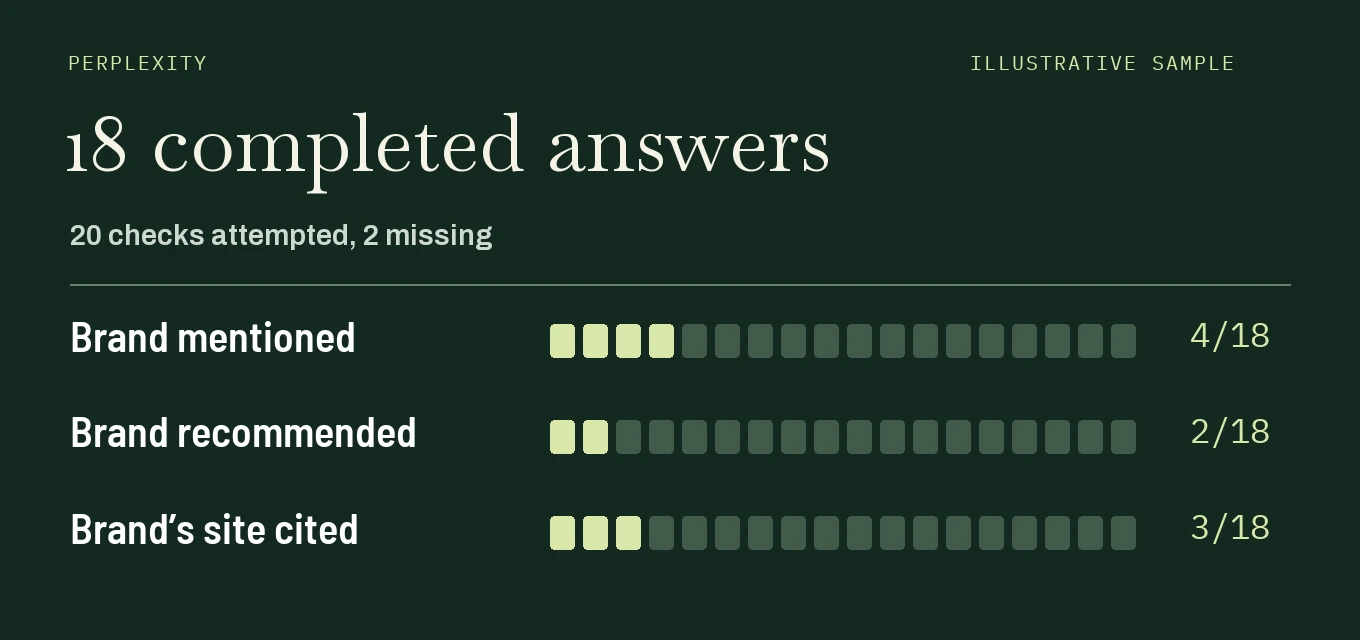
For example, suppose 20 unbranded questions return 18 usable answers. Four answers name your brand, two recommend it, and three cite your site. Mention rate is 4/18, recommendation rate is 2/18, and owned citation rate is 3/18. Report the two missing checks as well. This is an illustrative calculation. If an answer gives an explicitly ordered shortlist, you can record your position there. An unranked list or a general explanation does not establish a placement.
Inspect a citation before you change the site
Consider ReachLLM’s guide to GEO agencies that update existing pages. A link to that guide could support a description of editorial approvals, a recommendation for ReachLLM or a recommendation for another agency covered in the article. With the answer open, read the sentence next to the citation and check the destination. The URL alone cannot tell you which of those happened. Example comparison guide
If Perplexity repeatedly cites an outdated price on your own page, correct the price at its source and record the release date. If it cites an independent review of a competing product, read the review for the criterion the buyer asked about. Sometimes the competitor genuinely fits better. A later visit to a cited URL shows what that page says now. It cannot reveal every passage Perplexity retrieved during an earlier answer.
When is a paid tracker worth it?
For a handful of questions and an occasional review, the spreadsheet is enough. Test a paid tracker when the manual work becomes hard to repeat across products, countries or weekly reporting periods. Give the vendor one prompt of your choice and ask it to show the saved answer, exact URLs, test method and older observations. Check how it reports failed checks and whether you can export the evidence behind a chart.
In ReachLLM, Brand Visibility runs tracked questions through Perplexity’s direct integration. Use Responses to read what the answer said and Sources to inspect the linked URLs. Filter the prompt set to unbranded questions when evaluating discovery. If you also want to compare ChatGPT, Gemini and Claude, keep a separate result per platform before summarizing them. ReachLLM’s tracking method · Cross-platform tracker comparison
For revenue reporting, track identifiable Perplexity referral traffic and conversions separately. A buyer can see your name and visit later through a different channel. A citation or recommendation establishes what appeared in a sampled answer. Analytics records the visits it can attribute. AI search visibility and revenue measurement